An office robot does not need human-like hands to earn its space. A machine that carries documents, guides visitors, checks rooms, or joins a meeting from another site can remove small tasks that interrupt people all day.
The useful question is not whether a robot looks advanced. It is whether the task has a clear route, a repeatable result, and a safe way to handle mistakes.
- Routine movement: Robots can carry items between fixed points without calling a staff member away from their desk.
- Remote presence: A telepresence robot can let a person attend a meeting through a mobile screen and camera.
- Simple checks: Sensors can record room use, temperature, air quality, or open doors for later review.
Repeated trips are a good starting point
Office work includes more movement than many floor plans show. Staff carry mail, samples, files, supplies, and equipment between rooms. Each trip may take only a few minutes, but the interruption can break a task that needs focus.
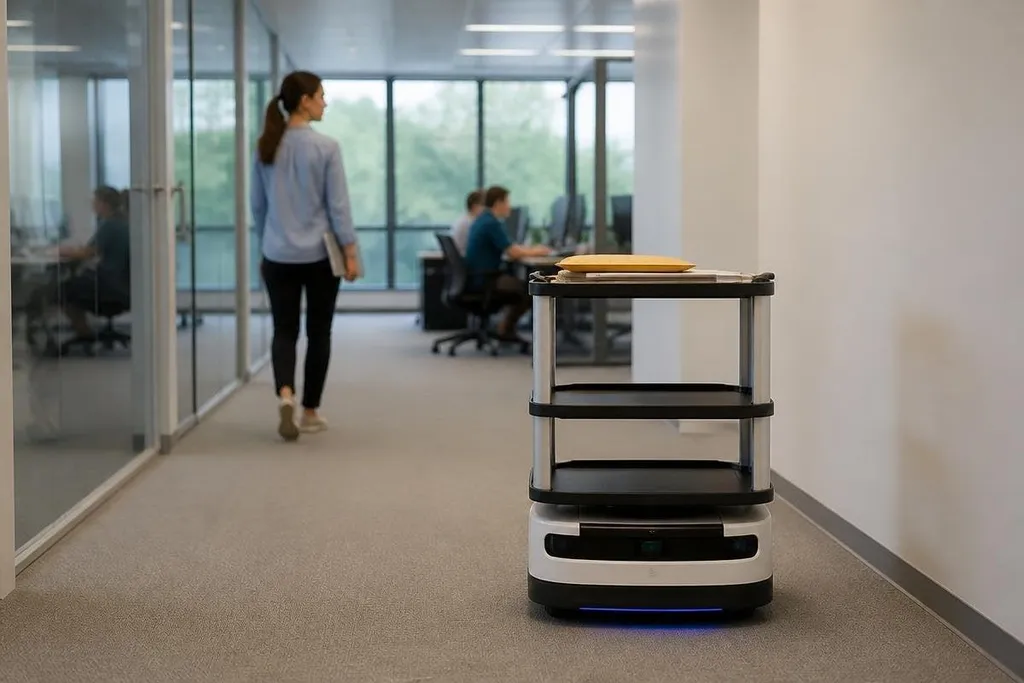
A mobile robot uses wheels, cameras, depth sensors, and software for navigation. A map gives it the layout, while sensors help it slow down or stop when a person, chair, or cart blocks the route.
That setup works best in places with wide paths and repeatable layouts. One moving between a mail room and several office zones has a clear job. A unit asked to find any object in an unfamiliar room has a much harder one.
The robot also needs a useful handoff. A locked storage box, a tray, or a screen can be enough for some deliveries. A staff member may still need to load the item and take it at the other end, so the robot removes the walking rather than the whole task.
Sensors turn a machine into a workplace tool
A robot becomes more useful when its sensors answer a question that staff already have. Cameras can record images. Microphones can carry speech for remote meetings. Air sensors can report conditions in a room. A touch screen can show instructions or call for help.
The software then connects those readings to a small set of actions. If a meeting room is occupied, the system can mark it in a booking tool. If a delivery route is blocked, the robot can wait or ask a person to clear it. If a sensor gives an unclear reading, the task should stop instead of producing a confident guess.
That last part matters. Office robots work near people, so a safe stop is more useful than a fast move. Waiting at a doorway may cut the number of completed trips, yet cause fewer interruptions and less risk.
For an office buyer, a report on Robot24 should tie a robot’s task to its stop rules, route, and human handoff. Those details matter even more for telepresence, where a remote person depends on the robot’s camera, network link, and wheels to take part in a meeting.
Telepresence solves a different office problem
A telepresence robot does not carry a load. It carries access to a person who cannot be at the site. A remote worker can steer through a building, look around with a camera, and speak through a screen and speaker.
The value depends on the meeting, not the robot’s shape. A remote inspection, a team discussion, or a visit to a lab may need movement and a live view. A short phone call may need neither.
Privacy also needs a clear rule. People should know when the camera and microphone are active, where recordings go, and who can control the robot. A charging station and a named person for support keep the system from becoming another abandoned device in a corner.
Where office robots still struggle
Office buildings change throughout the day. Chairs move, doors close, cables cross paths, and people stop in places that were empty during setup.
Mapped routes and sensors can handle some of this, but every new obstacle adds a chance to wait or ask for help.
Stairs remain a hard limit for many mobile robots. Heavy doors, lifts, loose rugs, reflective glass, and crowded corridors can also cause trouble. A site survey should happen before anyone buys hardware.
Data needs care too. Cameras and microphones may collect information about workers and visitors. The office needs a retention rule, access controls, and a way to disable recording where privacy requires it.
I'd skip an office robot if the task happens only a few times a week or needs constant human correction. The machine may look useful in a demo while adding charging, cleaning, software updates, and staff training.
A practical buying checklist
Use this list before choosing a machine:
- Name the task: Write down the exact work, start point, end point, and handoff.
- Count the trips: Measure how often the task happens during a normal week.
- Map the route: Check doors, lifts, stairs, floor surfaces, narrow paths, and busy areas.
- Set a stop rule: Decide when the robot waits and when a person takes over.
- Check the data: Record what the sensors collect, who can view it, and when it gets deleted.
- Price the support: Include charging space, repairs, software fees, training, and staff time.
A useful office robot has a narrow job that people can measure. The next step is to run that job in the real building, record how often help is needed, and compare the result with the time spent on support.